<?xml version="1.0" encoding="utf-8"?><feed xmlns="http://www.w3.org/2005/Atom" ><generator uri="https://jekyllrb.com/" version="3.10.0">Jekyll</generator><link href="https://rishmitar.github.io/feed.xml" rel="self" type="application/atom+xml" /><link href="https://rishmitar.github.io/" rel="alternate" type="text/html" /><updated>2026-09-03T02:52:07+00:00</updated><id>https://rishmitar.github.io/feed.xml</id><title type="html">Rishmita’s Portfolio</title><subtitle>My portfolio
</subtitle><author><name>Rishmita Rao</name><email>rishmita.rao12@gmail.com</email></author><entry><title type="html">Google Summer of Code 2026</title><link href="https://rishmitar.github.io/blog/2026/08/21/Google-Summer-of-Code-2026.html" rel="alternate" type="text/html" title="Google Summer of Code 2026" /><published>2026-08-21T00:00:00+00:00</published><updated>2026-08-21T00:00:00+00:00</updated><id>https://rishmitar.github.io/blog/2026/08/21/Google%20Summer%20of%20Code%202026</id><content type="html" xml:base="https://rishmitar.github.io/blog/2026/08/21/Google-Summer-of-Code-2026.html"><![CDATA[<p>This summer I worked with the <a href="https://tardis-sn.github.io/" target="_blank" rel="noopener noreferrer">TARDIS RT collaboration</a> through Google Summer of Code on improving the test coverage of the TARDIS plasma module. This post is a writeup of what the project was!</p>

<h2 id="what-is-tardis">What is TARDIS</h2>

<p>TARDIS RT is an open-science software package that simulates and analyzes supernovae and other transients using a Monte Carlo radiative transfer framework. The collaboration as a whole works on Type Ia progenitor problems, nucleosynthesis in neutron star mergers, progenitors of stripped core-collapse supernovae, and cosmology using Type IIP supernovae. Data from current and next-generation telescopes and surveys gets used by the TARDIS RT framework to answer those scientific questions.</p>

<h2 id="the-goals-of-the-project">The goals of the project</h2>

<p>The plasma module determines the ionization and excitation states of the supernova ejecta from the basic structure of the supernova - elemental abundances, densities, and radiation temperature. CodeCov, which is what TARDIS uses to track code coverage, does not accurately report coverage of the plasma. The plasma is passed as a parameter into models and simulations, so it’s indirectly covered in tests of entire simulations. CodeCov marks those lines as “covered,” but nothing is actually asserting that a given plasma property computes the right value. While some parts of the module did have direct tests, most of the module lacked direct tests that were easy to find. So the project had two goals: increase real test coverage of the plasma module, and make the tests that do exist easy to find and read.</p>

<h2 id="what-i-did">What I did</h2>

<p>The work split into two halves that fed each other: writing direct unit and regression tests for plasma properties, and mapping out the plasma module so that anyone could tell which parts of it are actually worth testing.</p>

<p>On the testing side, I wrote direct tests for the dilute Planckian radiation field, the radiative rates solver, and the basic plasma properties. For the basic properties I also set up a new <code class="language-plaintext highlighter-rouge">tardis/plasma/properties/tests/</code> package with its own <code class="language-plaintext highlighter-rouge">conftest.py</code>. Every regression test needed matching reference data, so a good chunk of the work included generating data and pushing it to the separate <code class="language-plaintext highlighter-rouge">tardis-regression-data</code> repo.</p>

<p>The second half was the part I didn’t anticipate spending as much time on, and it ended up being the more valuable deliverable. I wrote <a href="/assets/docs/tardis-plasma-module-documentation.pdf" target="_blank" rel="noopener noreferrer"> detailed documentation about the plasma module</a> which covered:</p>

<ul>
  <li>How the plasma is structured as a graph.</li>
  <li>How the plasma gets assembled.</li>
  <li>A class-by-class audit of every plasma property.</li>
</ul>

<p>To do this write up I leaned heavily on the VSCode test coverage tool. I ran only the plasma tests and then clicked into each class in the legacy property collection file of the plasma module (a file that essentially listed all the plasma properties into easy to import collections) to see whether the body of its <code class="language-plaintext highlighter-rouge">calculate</code> method lit up. This turned out to be the most reliable way to tell whether a property was used by the Tardis package or was simply being imported and unused.</p>

<h2 id="the-current-state">The current state</h2>

<p>There are now direct tests for the basic plasma properties, the dilute Planckian radiation field, and the radiative rates solver along with necessary reference data.</p>

<p>The documentation now shows exactly which parts of the plasma module are dead code, that either need to be refactored out of the codebase or be implemented into the codebase. Writing tests for these parts of the plasma module in its current state would be a waste of time.</p>

<p>I wrote all of this up as a standalone plasma module document that exists in the Tardis Google Drive, and this document will eventually be the basis for proper plasma documentation. The full thing is embedded below, and you can also <a href="/assets/docs/tardis-plasma-module-documentation.pdf" target="_blank" rel="noopener noreferrer">open it in a new tab</a> if the viewer doesn’t load. The document shows the complete property-by-property analysis.</p>

<div style="text-align: center;">
  <object data="/assets/docs/tardis-plasma-module-documentation.pdf" type="application/pdf" width="100%" height="800px">
    <iframe src="/assets/docs/tardis-plasma-module-documentation.pdf" width="100%" height="800px" style="border: none;">
      Your browser can't display embedded PDFs. <a href="/assets/docs/tardis-plasma-module-documentation.pdf" target="_blank" rel="noopener noreferrer">Download the TARDIS plasma module documentation here.</a>
    </iframe>
  </object>
  <br />
  <em>The TARDIS Plasma Module documentation</em>
</div>

<h2 id="whats-left-to-do">What’s left to do</h2>

<p>The most immediate gap is that TARDIS still has no published plasma documentation. The “how to create a plasma graph” docs page links to a Plasma Documentation page that doesn’t exist, which I filed as <a href="https://github.com/tardis-sn/tardis/issues/3645" target="_blank" rel="noopener noreferrer">issue #3645</a>. The document I wrote is meant to be the basis for that page.</p>

<p>Beyond that, the uncovered unreferenced code should come out of master. My suggestion, which could be a potential future GSOC project, is to remove dead code from the Master branch and reintroduce the code back into the Master branch in smaller PRs where the new plasma properties have example notebooks and example config files. A more ambitious approach is to fully refactor away from the NetworkX graph structure and toward solvers (a refactor process that’s halfway done that exists in the main codebase), which would need real design work with the core Tardis team first.</p>

<h2 id="what-got-merged-upstream">What got merged upstream</h2>

<p>Four PRs were pushed onto the TARDIS master:</p>

<table>
  <thead>
    <tr>
      <th>PR</th>
      <th>What it does</th>
    </tr>
  </thead>
  <tbody>
    <tr>
      <td><a href="https://github.com/tardis-sn/tardis/pull/3546" target="_blank" rel="noopener noreferrer">#3546</a></td>
      <td>Fixes the how-to-plasma-graph docs page, which was showing broken-image errors instead of the plasma graphs</td>
    </tr>
    <tr>
      <td><a href="https://github.com/tardis-sn/tardis/pull/3586" target="_blank" rel="noopener noreferrer">#3586</a></td>
      <td>Adds <code class="language-plaintext highlighter-rouge">test_radiative_rates.py</code> and test cases that confirm the asserts actually trigger</td>
    </tr>
    <tr>
      <td><a href="https://github.com/tardis-sn/tardis/pull/3606" target="_blank" rel="noopener noreferrer">#3606</a></td>
      <td>Adds the <code class="language-plaintext highlighter-rouge">plasma/properties/tests</code> package: unit tests for the basic properties plus the reusable <code class="language-plaintext highlighter-rouge">conftest.py</code></td>
    </tr>
    <tr>
      <td><a href="https://github.com/tardis-sn/tardis/pull/3585" target="_blank" rel="noopener noreferrer">#3585</a></td>
      <td>Adds direct tests for the dilute Planckian radiation field</td>
    </tr>
  </tbody>
</table>

<p>Four regression data PRs also merged into <code class="language-plaintext highlighter-rouge">tardis-regression-data</code>: <a href="https://github.com/tardis-sn/tardis-regression-data/pull/95" target="_blank" rel="noopener noreferrer">#95</a> (fixing atom data attributes that regression tests couldn’t read), <a href="https://github.com/tardis-sn/tardis-regression-data/pull/96" target="_blank" rel="noopener noreferrer">#96</a>, <a href="https://github.com/tardis-sn/tardis-regression-data/pull/98" target="_blank" rel="noopener noreferrer">#98</a>, and <a href="https://github.com/tardis-sn/tardis-regression-data/pull/101" target="_blank" rel="noopener noreferrer">#101</a>, each carrying the reference data for the corresponding test PR.</p>

<p>Not everything made it to Master, and I think the ones that didn’t are worth writing down too.</p>

<p><a href="https://github.com/tardis-sn/tardis/pull/3622" target="_blank" rel="noopener noreferrer">#3622</a> was closed unmerged in August. It rewrote <code class="language-plaintext highlighter-rouge">test_complete_plasmas.py</code> so that instead of checking whether a property exists as a key in the stored HDF5 file, the test checks whether the plasma object actually has the attribute. The old behavior is opaque — when a test is skipped you can’t tell whether the plasma genuinely lacks the property or whether the regression data is just being read wrong. The PR also emitted an explicit warning when a property goes missing, moved every test onto the regression data sync functions instead of raw <code class="language-plaintext highlighter-rouge">pd.read_hdf</code>, and dropped properties from the combined list that were being skipped every single time because no plasma has them. It had test failures I didn’t get fixed in time, and the maintainers closed it with a note that it can be reopened. Its companion regression data PR, <a href="https://github.com/tardis-sn/tardis-regression-data/pull/102" target="_blank" rel="noopener noreferrer">#102</a>, is still open.</p>

<h2 id="challenges-and-what-i-learned">Challenges and what I learned</h2>

<p>One of my biggest challenges throughout this project was navigating a new codebase and writing tests for it. The first tests I wrote were really redundant and unintentionally introduced a lot of code duplication. I eventually got the hang of how to write meaningful tests. Another testing challenge was finding out which covered lines truly had direct tests and which ones were being indirectly tested. I learned a lot about code coverage, documenting the outputs of pytests, and also how to step into the stack of a pytest to analyze the exact properties of a test. Throughout this whole process though, I did come to realize that when I dive into a new big codebase in the future, understanding the existing tests and coverage while simultaneously looking at code examples and documentation is a great way to understand a codebase in depth.</p>

<p>I also learned a lot about version control and how to properly use git when working on a large collaborative project. I had to really get into the practice of consistently pulling from main, stashing and popping changes when necessary, creating new branches per feature, and quadruple checking that my PRs only had relevant code. In the early stages of development, I pushed a lot of messy PRs with weird white space diffs, files from merges I did with branches on my own local development, and changes I accidentally pushed into one PR that should have existed solely on another PR.</p>

<h2 id="conclusion">Conclusion</h2>

<p>Working with Tardis for GSoC was incredible! I absolutely loved the Tardis community. On top of learning how to develop open source code for science, I learned about a wide variety of topics in scientific computing, got to refresh some of my astrophysics knowledge from undergrad, and I learned a lot about how cool supernovae are. Any questions I had about either the codebase or the science were answered basically immediately on Slack, and I felt like I jumped straight into the community doing really important work by getting to work with a fellow GSoC contributor on unpinning the Tardis environment. Overall, this GSoC 2026 was such a meaningful experience that I’ve learnt so much from.</p>]]></content><author><name>Rishmita Rao</name><email>rishmita.rao12@gmail.com</email></author><category term="blog" /><category term="blog" /><category term="Google Summer of Code" /><category term="Open Source" /><category term="Astrophysics" /><category term="TardisRT" /><category term="PyTest" /><summary type="html"><![CDATA[This summer I worked with the TARDIS RT collaboration through Google Summer of Code on improving the test coverage of the TARDIS plasma module. This post is a writeup of what the project was! What is TARDIS TARDIS RT is an open-science software package that simulates and analyzes supernovae and other transients using a Monte Carlo radiative transfer framework. The collaboration as a whole works on Type Ia progenitor problems, nucleosynthesis in neutron star mergers, progenitors of stripped core-collapse supernovae, and cosmology using Type IIP supernovae. Data from current and next-generation telescopes and surveys gets used by the TARDIS RT framework to answer those scientific questions. The goals of the project The plasma module determines the ionization and excitation states of the supernova ejecta from the basic structure of the supernova - elemental abundances, densities, and radiation temperature. CodeCov, which is what TARDIS uses to track code coverage, does not accurately report coverage of the plasma. The plasma is passed as a parameter into models and simulations, so it’s indirectly covered in tests of entire simulations. CodeCov marks those lines as “covered,” but nothing is actually asserting that a given plasma property computes the right value. While some parts of the module did have direct tests, most of the module lacked direct tests that were easy to find. So the project had two goals: increase real test coverage of the plasma module, and make the tests that do exist easy to find and read. What I did The work split into two halves that fed each other: writing direct unit and regression tests for plasma properties, and mapping out the plasma module so that anyone could tell which parts of it are actually worth testing. On the testing side, I wrote direct tests for the dilute Planckian radiation field, the radiative rates solver, and the basic plasma properties. For the basic properties I also set up a new tardis/plasma/properties/tests/ package with its own conftest.py. Every regression test needed matching reference data, so a good chunk of the work included generating data and pushing it to the separate tardis-regression-data repo. The second half was the part I didn’t anticipate spending as much time on, and it ended up being the more valuable deliverable. I wrote detailed documentation about the plasma module which covered: How the plasma is structured as a graph. How the plasma gets assembled. A class-by-class audit of every plasma property. To do this write up I leaned heavily on the VSCode test coverage tool. I ran only the plasma tests and then clicked into each class in the legacy property collection file of the plasma module (a file that essentially listed all the plasma properties into easy to import collections) to see whether the body of its calculate method lit up. This turned out to be the most reliable way to tell whether a property was used by the Tardis package or was simply being imported and unused. The current state There are now direct tests for the basic plasma properties, the dilute Planckian radiation field, and the radiative rates solver along with necessary reference data. The documentation now shows exactly which parts of the plasma module are dead code, that either need to be refactored out of the codebase or be implemented into the codebase. Writing tests for these parts of the plasma module in its current state would be a waste of time. I wrote all of this up as a standalone plasma module document that exists in the Tardis Google Drive, and this document will eventually be the basis for proper plasma documentation. The full thing is embedded below, and you can also open it in a new tab if the viewer doesn’t load. The document shows the complete property-by-property analysis. Your browser can't display embedded PDFs. Download the TARDIS plasma module documentation here. The TARDIS Plasma Module documentation What’s left to do The most immediate gap is that TARDIS still has no published plasma documentation. The “how to create a plasma graph” docs page links to a Plasma Documentation page that doesn’t exist, which I filed as issue #3645. The document I wrote is meant to be the basis for that page. Beyond that, the uncovered unreferenced code should come out of master. My suggestion, which could be a potential future GSOC project, is to remove dead code from the Master branch and reintroduce the code back into the Master branch in smaller PRs where the new plasma properties have example notebooks and example config files. A more ambitious approach is to fully refactor away from the NetworkX graph structure and toward solvers (a refactor process that’s halfway done that exists in the main codebase), which would need real design work with the core Tardis team first. What got merged upstream Four PRs were pushed onto the TARDIS master: PR What it does #3546 Fixes the how-to-plasma-graph docs page, which was showing broken-image errors instead of the plasma graphs #3586 Adds test_radiative_rates.py and test cases that confirm the asserts actually trigger #3606 Adds the plasma/properties/tests package: unit tests for the basic properties plus the reusable conftest.py #3585 Adds direct tests for the dilute Planckian radiation field Four regression data PRs also merged into tardis-regression-data: #95 (fixing atom data attributes that regression tests couldn’t read), #96, #98, and #101, each carrying the reference data for the corresponding test PR. Not everything made it to Master, and I think the ones that didn’t are worth writing down too. #3622 was closed unmerged in August. It rewrote test_complete_plasmas.py so that instead of checking whether a property exists as a key in the stored HDF5 file, the test checks whether the plasma object actually has the attribute. The old behavior is opaque — when a test is skipped you can’t tell whether the plasma genuinely lacks the property or whether the regression data is just being read wrong. The PR also emitted an explicit warning when a property goes missing, moved every test onto the regression data sync functions instead of raw pd.read_hdf, and dropped properties from the combined list that were being skipped every single time because no plasma has them. It had test failures I didn’t get fixed in time, and the maintainers closed it with a note that it can be reopened. Its companion regression data PR, #102, is still open. Challenges and what I learned One of my biggest challenges throughout this project was navigating a new codebase and writing tests for it. The first tests I wrote were really redundant and unintentionally introduced a lot of code duplication. I eventually got the hang of how to write meaningful tests. Another testing challenge was finding out which covered lines truly had direct tests and which ones were being indirectly tested. I learned a lot about code coverage, documenting the outputs of pytests, and also how to step into the stack of a pytest to analyze the exact properties of a test. Throughout this whole process though, I did come to realize that when I dive into a new big codebase in the future, understanding the existing tests and coverage while simultaneously looking at code examples and documentation is a great way to understand a codebase in depth. I also learned a lot about version control and how to properly use git when working on a large collaborative project. I had to really get into the practice of consistently pulling from main, stashing and popping changes when necessary, creating new branches per feature, and quadruple checking that my PRs only had relevant code. In the early stages of development, I pushed a lot of messy PRs with weird white space diffs, files from merges I did with branches on my own local development, and changes I accidentally pushed into one PR that should have existed solely on another PR. Conclusion Working with Tardis for GSoC was incredible! I absolutely loved the Tardis community. On top of learning how to develop open source code for science, I learned about a wide variety of topics in scientific computing, got to refresh some of my astrophysics knowledge from undergrad, and I learned a lot about how cool supernovae are. Any questions I had about either the codebase or the science were answered basically immediately on Slack, and I felt like I jumped straight into the community doing really important work by getting to work with a fellow GSoC contributor on unpinning the Tardis environment. Overall, this GSoC 2026 was such a meaningful experience that I’ve learnt so much from.]]></summary></entry><entry><title type="html">Life Time Albums EDA Dashboard</title><link href="https://rishmitar.github.io/blog/2026/02/16/Album-Per-Year-Streamlit.html" rel="alternate" type="text/html" title="Life Time Albums EDA Dashboard" /><published>2026-02-16T00:00:00+00:00</published><updated>2026-02-16T00:00:00+00:00</updated><id>https://rishmitar.github.io/blog/2026/02/16/Album%20Per%20Year%20Streamlit</id><content type="html" xml:base="https://rishmitar.github.io/blog/2026/02/16/Album-Per-Year-Streamlit.html"><![CDATA[<p>A while ago I went into training the reccomendor model for the Life Time Albums project basically blind. I thought I could start training without doing comprehensive exploratory data analysis because I put together the dataset myself and that being familliar with the structure of the data was enough to just start training the data. That was a silly assumption. I didn’t even get that far into splitting my data into test vs train before realizing I don’t know how I should normalize the weights, how to incorporate genre consideration into training when it seemed like the genre was stored as sets rather than a python list, and how I can generate feature vectors that might be useful to find albums that aren’t in the Listenbrainz dataset itself. It also realized it would be useful to see where album release dates skew to see the age range of users who will most likely get the best reccomendations.</p>

<p>So I did what I should have done before even attempting to train - I performed EDA in a Jupyter Notebook. I also went ahead and put the most interesting insights of that EDA into a streamlit dashboard: <a href="https://album-per-year.streamlit.app" target="_blank" rel="noopener noreferrer"> album-per-year.streamlit.app</a></p>

<p>If the deployed dashboard is not working - which is an issue on the server side of streamlit and is not an issue with my dashboard - here are the instructions to run the dashboard on your local machine:</p>

<div class="language-bash highlighter-rouge"><div class="highlight"><pre class="highlight"><code>git clone https://github.com/RishmitaR/Album-Per-Year-Data-Dashboard.git
<span class="nb">cd </span>Album-Per-Year-Data-Dashboard.git
pip <span class="nb">install</span> <span class="nt">-r</span> requirements.txt
streamlit run app.py
</code></pre></div></div>
<p>You can optionally create a annoconda or virtual environment to install the python packages in.</p>

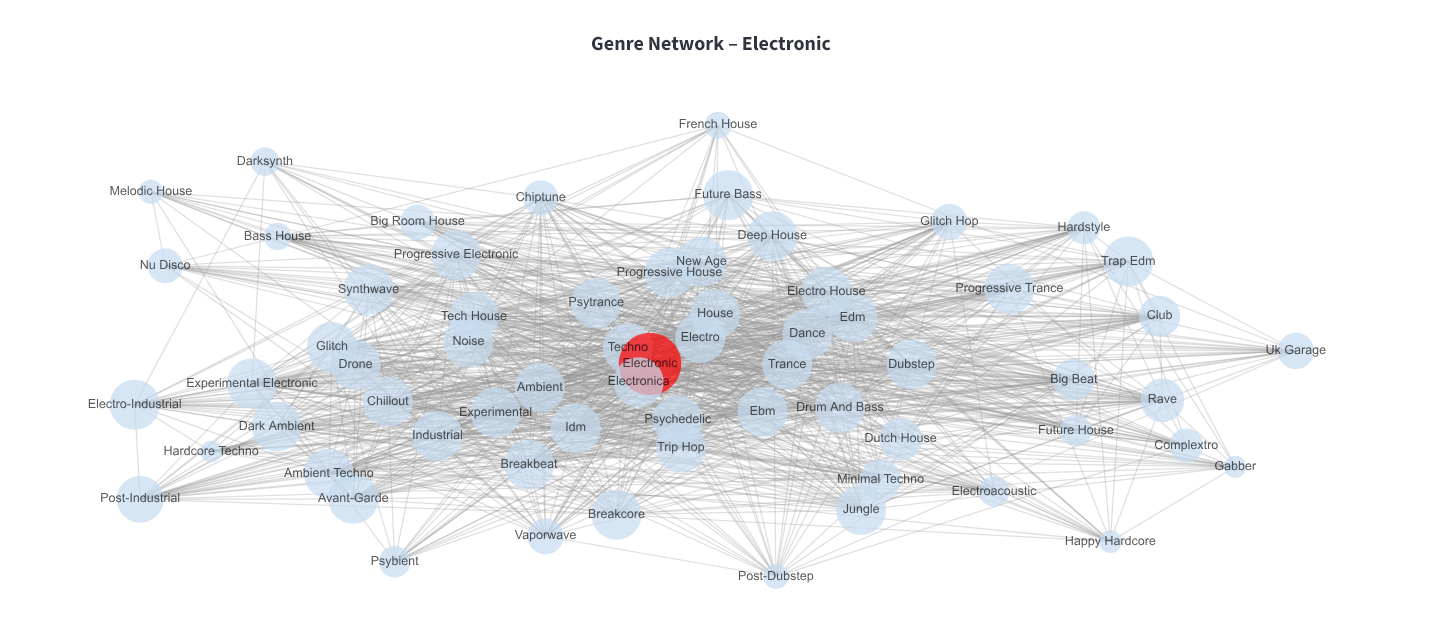
<p>Here’s a representation of a louvian community generated from the genre co-occurance network built during EDA. I think these genre communities are the coolest pieces of visualization in the dashboard.</p>

<p align-text="left">
  <img src="/assets/images/electronic_network.png" alt="Flow Chart" width="100%" />
  <br />
  <em>Electronic Music Genre Network</em>
</p>

<p>I also took making this dashboard as an oppurtunity to practice vibe-coding with Cursor’s free trial and Copilot on VsCode. I wrote a majority of functions that manipulate pandas data frames and create charts, and I asked AI agents to format it all into a dashboard based on what I’ve already done in my notebook. I think this was a good exercise in making sure I don’t frivolously prompt AI as I actually ran out of Cursor credits pretty quickly - though I do think if I had known how many calls I can make in the free version I would have prompted way less. I want to make sure I strike a balance between understanding and automation. Generally I tried to prompt with very specific instructions i.e “get the genre co-occurances by doing a groupby album_name on this data frame and plot it on a horizontal bar plot”. When I forgot to be specific and got too comfortable with the capabilities of the AI I noticed I was spending a lot of time on fixing minor issues with formatting discrpencies and ugly colors that could have been mitigated if I had given hard styling rules at the top of the prompt. As I type this all out it feels obvious, but I’m trying to give myself some slack because I’m pretty new to coding like this. I’ve used AI to supplement my coding before, but it was typically for debugging or for when I was learning a new package and needed information quickly on how to use it.</p>

<p>Now that it’s the era of generating code I’ve decided to start developing prompting strategies and a personal AI use philosophy. If I generate code that I don’t understand with packages I’ve never heard or if I ask the agents to write code I couldn’t think of how to write myself it’s super important I learn how the package the AI generated works, understand the code the agent generated (what all the parameters and returns are every function are, what data structures used, etc), and I should be able to make fine adjustments to generated code myself without the agent.</p>

<p>Overall this was a good exercise in developing my own vibe-coding strategies and philosophy, and it makes me think that I should start making prompting “cheat sheets” for different systems that I tend to build for my projects a lot (dashboards, front-end, back-end apis).</p>]]></content><author><name>Rishmita Rao</name><email>rishmita.rao12@gmail.com</email></author><category term="blog" /><category term="blog" /><category term="Life Time Albums" /><summary type="html"><![CDATA[A while ago I went into training the reccomendor model for the Life Time Albums project basically blind. I thought I could start training without doing comprehensive exploratory data analysis because I put together the dataset myself and that being familliar with the structure of the data was enough to just start training the data. That was a silly assumption. I didn’t even get that far into splitting my data into test vs train before realizing I don’t know how I should normalize the weights, how to incorporate genre consideration into training when it seemed like the genre was stored as sets rather than a python list, and how I can generate feature vectors that might be useful to find albums that aren’t in the Listenbrainz dataset itself. It also realized it would be useful to see where album release dates skew to see the age range of users who will most likely get the best reccomendations. So I did what I should have done before even attempting to train - I performed EDA in a Jupyter Notebook. I also went ahead and put the most interesting insights of that EDA into a streamlit dashboard: album-per-year.streamlit.app If the deployed dashboard is not working - which is an issue on the server side of streamlit and is not an issue with my dashboard - here are the instructions to run the dashboard on your local machine: git clone https://github.com/RishmitaR/Album-Per-Year-Data-Dashboard.git cd Album-Per-Year-Data-Dashboard.git pip install -r requirements.txt streamlit run app.py You can optionally create a annoconda or virtual environment to install the python packages in. Here’s a representation of a louvian community generated from the genre co-occurance network built during EDA. I think these genre communities are the coolest pieces of visualization in the dashboard. Electronic Music Genre Network I also took making this dashboard as an oppurtunity to practice vibe-coding with Cursor’s free trial and Copilot on VsCode. I wrote a majority of functions that manipulate pandas data frames and create charts, and I asked AI agents to format it all into a dashboard based on what I’ve already done in my notebook. I think this was a good exercise in making sure I don’t frivolously prompt AI as I actually ran out of Cursor credits pretty quickly - though I do think if I had known how many calls I can make in the free version I would have prompted way less. I want to make sure I strike a balance between understanding and automation. Generally I tried to prompt with very specific instructions i.e “get the genre co-occurances by doing a groupby album_name on this data frame and plot it on a horizontal bar plot”. When I forgot to be specific and got too comfortable with the capabilities of the AI I noticed I was spending a lot of time on fixing minor issues with formatting discrpencies and ugly colors that could have been mitigated if I had given hard styling rules at the top of the prompt. As I type this all out it feels obvious, but I’m trying to give myself some slack because I’m pretty new to coding like this. I’ve used AI to supplement my coding before, but it was typically for debugging or for when I was learning a new package and needed information quickly on how to use it. Now that it’s the era of generating code I’ve decided to start developing prompting strategies and a personal AI use philosophy. If I generate code that I don’t understand with packages I’ve never heard or if I ask the agents to write code I couldn’t think of how to write myself it’s super important I learn how the package the AI generated works, understand the code the agent generated (what all the parameters and returns are every function are, what data structures used, etc), and I should be able to make fine adjustments to generated code myself without the agent. Overall this was a good exercise in developing my own vibe-coding strategies and philosophy, and it makes me think that I should start making prompting “cheat sheets” for different systems that I tend to build for my projects a lot (dashboards, front-end, back-end apis).]]></summary></entry><entry><title type="html">Lifetime Albums</title><link href="https://rishmitar.github.io/projects/project/2026/01/25/Album-Per-Year.html" rel="alternate" type="text/html" title="Lifetime Albums" /><published>2026-01-25T00:00:00+00:00</published><updated>2026-01-25T00:00:00+00:00</updated><id>https://rishmitar.github.io/projects/project/2026/01/25/Album-Per-Year</id><content type="html" xml:base="https://rishmitar.github.io/projects/project/2026/01/25/Album-Per-Year.html"><![CDATA[<p>Album-Per-Year (not the final name) is a web app that lets users connect their Spotify or Last.fm account, enter their birthday, and then select one of their favorite albums released each year they’ve been alive. At the end, the app generates a Topsters-style album chart.The idea for this project came from a trend in online music communities where many of my friends were sharing charts of their favorite albums released for every year they’ve been alive. I wanted to make my own, but it was tedious to recall every album I loved and remember its release year. That inspired me to build a tool that could automate the process in a fun way. While the core functionality of the application is complete, I decided to expand this project into an oppurtunity to learn how to build and deploy reccomendation models. The next major feature is a recommendation engine that predicts which albums a user has likely listened to and loved by generating a feature vector from their Spotify or Last.fm profile data. This vector is then passed to a TensorFlow Recommenders model to suggest albums that can populate the chart. This approach helps serve albums to users who don’t typically save full albums to their music library.</p>

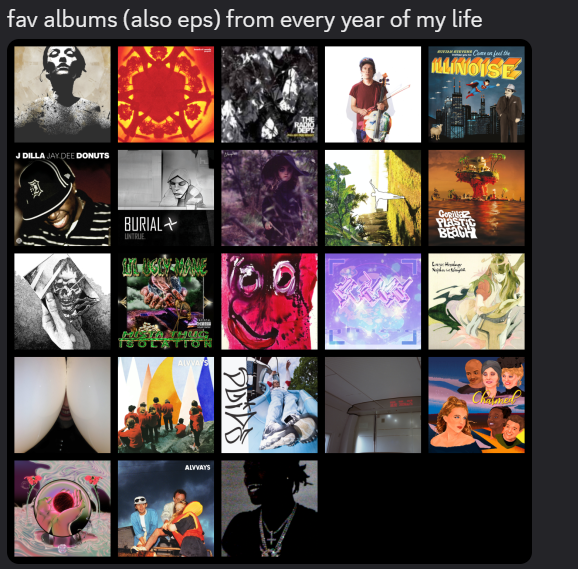
<p text-align="left">
  <img src="/assets/images/topster.png" alt="Topster Chart Example" width="40%" />
  <br />
  <em>Example of the trend</em>
</p>

<p><strong>Project Status</strong>
This project is currently a WIP</p>
<ul class="task-list">
  <li class="task-list-item"><input type="checkbox" class="task-list-item-checkbox" disabled="disabled" checked="checked" />Core backend and Spotify API integration</li>
  <li class="task-list-item"><input type="checkbox" class="task-list-item-checkbox" disabled="disabled" checked="checked" />PostgreSQL database populated with user and album data</li>
  <li class="task-list-item"><input type="checkbox" class="task-list-item-checkbox" disabled="disabled" checked="checked" />Frontend: barebones UI for login, birthday input, and album selection</li>
  <li class="task-list-item"><input type="checkbox" class="task-list-item-checkbox" disabled="disabled" checked="checked" />Simple chart rendering</li>
  <li class="task-list-item"><input type="checkbox" class="task-list-item-checkbox" disabled="disabled" />Integrate Last.fm API</li>
  <li class="task-list-item"><input type="checkbox" class="task-list-item-checkbox" disabled="disabled" />TensorFlow Recommenders model trained and functional (IN PROGRESS)</li>
  <li class="task-list-item"><input type="checkbox" class="task-list-item-checkbox" disabled="disabled" />Machine learning integration with backend (IN PROGRESS)</li>
  <li class="task-list-item"><input type="checkbox" class="task-list-item-checkbox" disabled="disabled" />Deploy live version (IN PROGRESS)</li>
</ul>

<p><strong>How The Final Product Will Work</strong></p>
<ol>
  <li>Login &amp; Setup: Users authenticate through Spotify or Last.fm, granting the app permission to access limited profile and listening data.</li>
  <li>Enter Your Birthday: The app determines the range of years to include — one album for each year you’ve been alive.</li>
  <li>Choose Your Albums: For each year, the user selects a favorite album fetched from Spotify. The backend retrieves release metadata (artist, title, year) for each selection.</li>
  <li>Generate the Chart: Once complete, the app creates a Topsters-style album chart, listing each album’s title, artist, release year</li>
</ol>

<p><strong>Machine Learning Component</strong></p>

<p>Training Data: 40,000+ users from the <a href="https://listenbrainz.org/about/">ListenBrainz</a> dataset with artist, genre, and release information from <a href="https://musicbrainz.org/doc/MusicBrainz_Database">MusicBrainz</a></p>

<p>Goal: Recommend albums that fit each user’s listening habits based on limited profile information (e.g., recent plays, top artists).</p>

<p>Prediction Workflow:</p>
<ol>
  <li>User logs in with Spotify or Last.fm</li>
  <li>Backend generates a user feature vector</li>
  <li>TensorFlow Recommenders model predicts likely-loved albums</li>
  <li>Recommended albums are displayed visually on the chart</li>
</ol>

<p>This feature is designed to enhance the experience for users who may not have saved albums but still want an accurate reflection of their musical tastes.</p>

<p>The code for the model is currently being developed in a jupyter-notebook stored at this repository: https://github.com/RishmitaR/Lifetime_Albums_TF_Reccomendor</p>

<p>To run current web application code:</p>

<p><strong>Setup &amp; Installation</strong>
Prerequisites
Node.js (v18 or later)
npm
PostgreSQL</p>

<ol>
  <li>Clone the Repository
    <div class="language-plaintext highlighter-rouge"><div class="highlight"><pre class="highlight"><code>git clone https://github.com/RishmitaR/Album-Per-Year.git
cd album-per-year
</code></pre></div>    </div>
  </li>
  <li>Install Dependencies
    <div class="language-plaintext highlighter-rouge"><div class="highlight"><pre class="highlight"><code>npm install
</code></pre></div>    </div>
  </li>
  <li>Setup Environment File in the server folder
    <div class="language-plaintext highlighter-rouge"><div class="highlight"><pre class="highlight"><code>SPOTIFY_CLIENT_ID=your_spotify_client_id
SPOTIFY_CLIENT_SECRET=your_spotify_client_secret
SPOTIFY_REDIRECT_URI=http://localhost:3000/callback
</code></pre></div>    </div>
    <p>Obtain Spotify credentials by creating a developer app at the Spotify Developer Dashboard</p>
  </li>
</ol>]]></content><author><name>Rishmita Rao</name><email>rishmita.rao12@gmail.com</email></author><category term="projects" /><category term="project" /><summary type="html"><![CDATA[Album-Per-Year (not the final name) is a web app that lets users connect their Spotify or Last.fm account, enter their birthday, and then select one of their favorite albums released each year they’ve been alive. At the end, the app generates a Topsters-style album chart.The idea for this project came from a trend in online music communities where many of my friends were sharing charts of their favorite albums released for every year they’ve been alive. I wanted to make my own, but it was tedious to recall every album I loved and remember its release year. That inspired me to build a tool that could automate the process in a fun way. While the core functionality of the application is complete, I decided to expand this project into an oppurtunity to learn how to build and deploy reccomendation models. The next major feature is a recommendation engine that predicts which albums a user has likely listened to and loved by generating a feature vector from their Spotify or Last.fm profile data. This vector is then passed to a TensorFlow Recommenders model to suggest albums that can populate the chart. This approach helps serve albums to users who don’t typically save full albums to their music library. Example of the trend Project Status This project is currently a WIP Core backend and Spotify API integration PostgreSQL database populated with user and album data Frontend: barebones UI for login, birthday input, and album selection Simple chart rendering Integrate Last.fm API TensorFlow Recommenders model trained and functional (IN PROGRESS) Machine learning integration with backend (IN PROGRESS) Deploy live version (IN PROGRESS) How The Final Product Will Work Login &amp; Setup: Users authenticate through Spotify or Last.fm, granting the app permission to access limited profile and listening data. Enter Your Birthday: The app determines the range of years to include — one album for each year you’ve been alive. Choose Your Albums: For each year, the user selects a favorite album fetched from Spotify. The backend retrieves release metadata (artist, title, year) for each selection. Generate the Chart: Once complete, the app creates a Topsters-style album chart, listing each album’s title, artist, release year Machine Learning Component Training Data: 40,000+ users from the ListenBrainz dataset with artist, genre, and release information from MusicBrainz Goal: Recommend albums that fit each user’s listening habits based on limited profile information (e.g., recent plays, top artists). Prediction Workflow: User logs in with Spotify or Last.fm Backend generates a user feature vector TensorFlow Recommenders model predicts likely-loved albums Recommended albums are displayed visually on the chart This feature is designed to enhance the experience for users who may not have saved albums but still want an accurate reflection of their musical tastes. The code for the model is currently being developed in a jupyter-notebook stored at this repository: https://github.com/RishmitaR/Lifetime_Albums_TF_Reccomendor To run current web application code: Setup &amp; Installation Prerequisites Node.js (v18 or later) npm PostgreSQL Clone the Repository git clone https://github.com/RishmitaR/Album-Per-Year.git cd album-per-year Install Dependencies npm install Setup Environment File in the server folder SPOTIFY_CLIENT_ID=your_spotify_client_id SPOTIFY_CLIENT_SECRET=your_spotify_client_secret SPOTIFY_REDIRECT_URI=http://localhost:3000/callback Obtain Spotify credentials by creating a developer app at the Spotify Developer Dashboard]]></summary></entry><entry><title type="html">Parameters of Non Star Forming Galaxies (AKA My Undergrad Research)</title><link href="https://rishmitar.github.io/projects/project/2026/01/23/Galaxy_Research.html" rel="alternate" type="text/html" title="Parameters of Non Star Forming Galaxies (AKA My Undergrad Research)" /><published>2026-01-23T00:00:00+00:00</published><updated>2026-01-23T00:00:00+00:00</updated><id>https://rishmitar.github.io/projects/project/2026/01/23/Galaxy_Research</id><content type="html" xml:base="https://rishmitar.github.io/projects/project/2026/01/23/Galaxy_Research.html"><![CDATA[<p>Click <a href="https://aas242-aas.ipostersessions.com/Default.aspx?s=36-86-58-BA-A9-45-8B-40-6D-7D-1E-BC-A9-F0-0A-1B" target="_blank" rel="noopener noreferrer"> here</a> for the link to the IPoster that explains my undergraduate research! I presented this at the 245th American Astronomical Society conference in January, 2025. In the future I’m going to directly recreate the Iposter on this page so I can cohesively highlight my work in one location and keep the visuals themed to my portfolio.</p>]]></content><author><name>Rishmita Rao</name><email>rishmita.rao12@gmail.com</email></author><category term="projects" /><category term="project" /><summary type="html"><![CDATA[Click here for the link to the IPoster that explains my undergraduate research! I presented this at the 245th American Astronomical Society conference in January, 2025. In the future I’m going to directly recreate the Iposter on this page so I can cohesively highlight my work in one location and keep the visuals themed to my portfolio.]]></summary></entry><entry><title type="html">Implementing Agents at the PLC</title><link href="https://rishmitar.github.io/projects/project/2026/01/23/PLC_Agents.html" rel="alternate" type="text/html" title="Implementing Agents at the PLC" /><published>2026-01-23T00:00:00+00:00</published><updated>2026-01-23T00:00:00+00:00</updated><id>https://rishmitar.github.io/projects/project/2026/01/23/PLC_Agents</id><content type="html" xml:base="https://rishmitar.github.io/projects/project/2026/01/23/PLC_Agents.html"><![CDATA[<p>The <a href="https://plc.tamu.edu/">TAMU Physics Lab Center</a> is responsible for setting up labs used in the physics ciriculum, building physics demonstrations, and for delivering physics demonstrations to physics professors. We currently have a website with all the physics demonstrations that can be ordered, but one big issue with our current ordering process is that unless a professor already havs a 
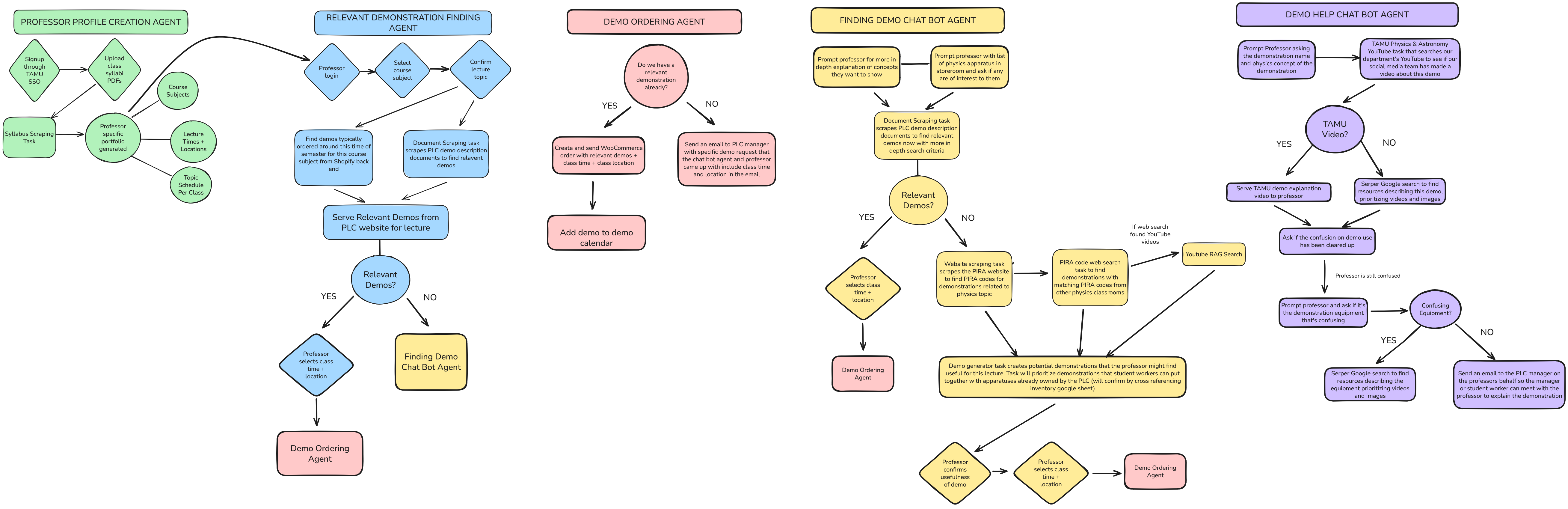
good understanding of what demonstrations are in the storeroom there are a lot of demos that never get ordered. This is because the categorization of demonstrations on our website is very broad. In order to help professors find the best demonstration for their lecture I am developing a CrewAI-powered multi-agent system that automates the end-to-end process of ordering a lecture. The diagram below explains the ideal flow of the final working system.</p>

<p align-text="left">
  <img src="/assets/images/flow_updated.png" alt="Flow Chart" width="100%" />
  <br />
  <em>Flowchart of Agents in Final Working Product</em>
</p>

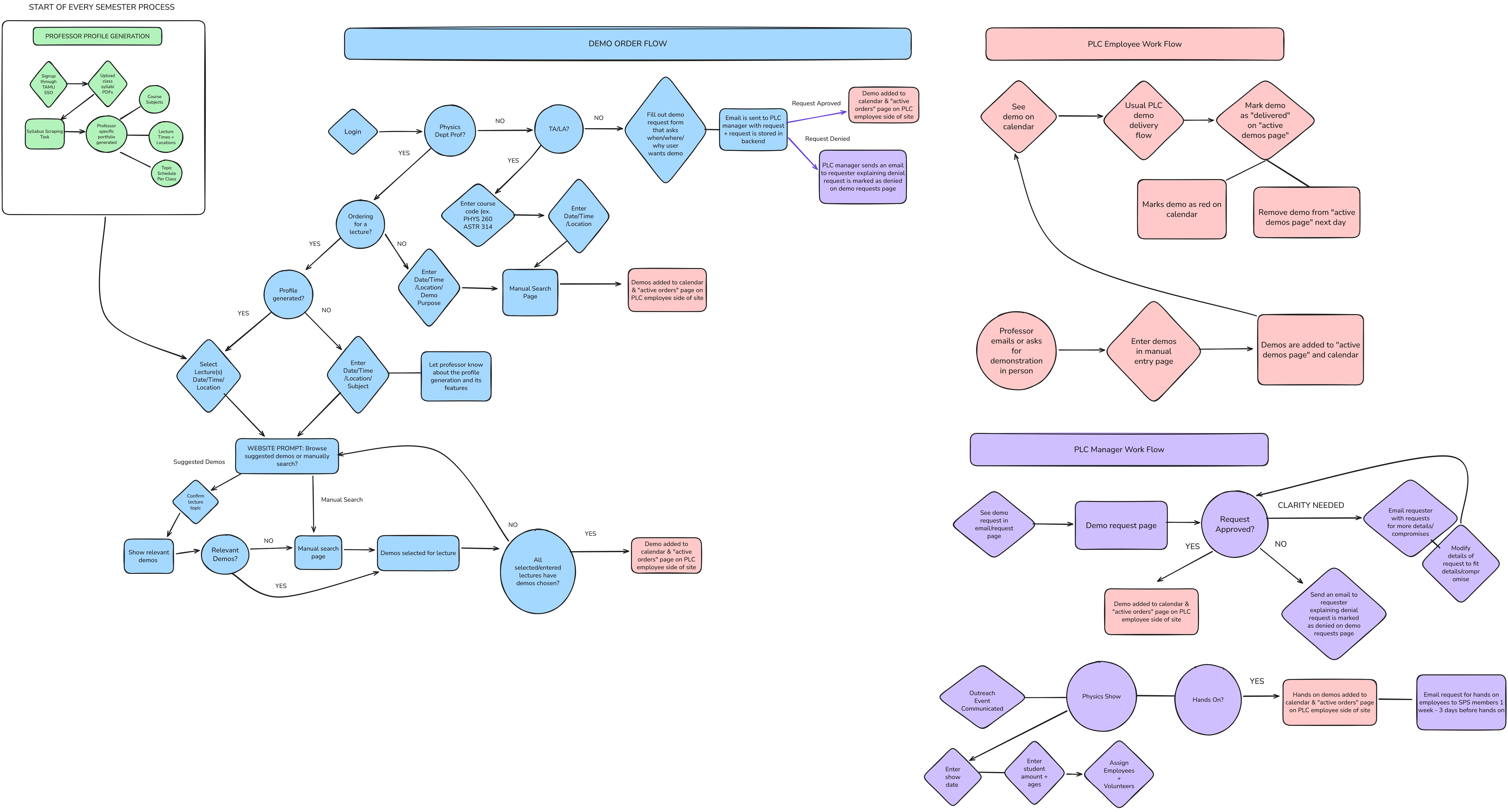
<p>This project is currently very WIP, I’d ideally like to turn this into a web application with a mock UI fed with real class syllabi before pitching this to my boss as something to implement on our live website. I also want to do more development on the live website <a href="/projects/project/2026/01/23/PLC_Website.html" target="_blank"> (read more about how I’m updating the PLC website here)</a> before introducing agents to the PLC - so for now the agents live in my local development space!</p>]]></content><author><name>Rishmita Rao</name><email>rishmita.rao12@gmail.com</email></author><category term="projects" /><category term="project" /><summary type="html"><![CDATA[The TAMU Physics Lab Center is responsible for setting up labs used in the physics ciriculum, building physics demonstrations, and for delivering physics demonstrations to physics professors. We currently have a website with all the physics demonstrations that can be ordered, but one big issue with our current ordering process is that unless a professor already havs a good understanding of what demonstrations are in the storeroom there are a lot of demos that never get ordered. This is because the categorization of demonstrations on our website is very broad. In order to help professors find the best demonstration for their lecture I am developing a CrewAI-powered multi-agent system that automates the end-to-end process of ordering a lecture. The diagram below explains the ideal flow of the final working system. Flowchart of Agents in Final Working Product This project is currently very WIP, I’d ideally like to turn this into a web application with a mock UI fed with real class syllabi before pitching this to my boss as something to implement on our live website. I also want to do more development on the live website (read more about how I’m updating the PLC website here) before introducing agents to the PLC - so for now the agents live in my local development space!]]></summary></entry><entry><title type="html">PLC Website Redesign</title><link href="https://rishmitar.github.io/projects/project/2026/01/23/PLC_Website.html" rel="alternate" type="text/html" title="PLC Website Redesign" /><published>2026-01-23T00:00:00+00:00</published><updated>2026-01-23T00:00:00+00:00</updated><id>https://rishmitar.github.io/projects/project/2026/01/23/PLC_Website</id><content type="html" xml:base="https://rishmitar.github.io/projects/project/2026/01/23/PLC_Website.html"><![CDATA[<p>The <a href="https://plc.tamu.edu/">TAMU Physics Lab Center</a> is responsible for setting up labs used in the physics ciriculum, building physics demonstrations, and for delivering physics demonstrations to physics professors. I’m currently working on updating the website with some minor tweaks and adding some features that will automate a lot of redundancy for PLC workers. I’ve already implemented a feature that automatically adds a demo to our demo delivery google calander when a professor orders said demo and I am now making user interface adjustments that will give professors more options when ordering a demonstration. The flow chart below shows what the final ideal flow of the website will look like.</p>

<p align-text="left">
  <img src="/assets/images/PLC-Website-Flow.png" alt="Flow Chart" width="100%" />
  <br />
  <em>Flowchart of Ideal Website Workflow</em>
</p>

<p>The next big step is to update our SQL database with our labratory inventory and non demo materials.</p>]]></content><author><name>Rishmita Rao</name><email>rishmita.rao12@gmail.com</email></author><category term="projects" /><category term="project" /><summary type="html"><![CDATA[The TAMU Physics Lab Center is responsible for setting up labs used in the physics ciriculum, building physics demonstrations, and for delivering physics demonstrations to physics professors. I’m currently working on updating the website with some minor tweaks and adding some features that will automate a lot of redundancy for PLC workers. I’ve already implemented a feature that automatically adds a demo to our demo delivery google calander when a professor orders said demo and I am now making user interface adjustments that will give professors more options when ordering a demonstration. The flow chart below shows what the final ideal flow of the website will look like. Flowchart of Ideal Website Workflow The next big step is to update our SQL database with our labratory inventory and non demo materials.]]></summary></entry><entry><title type="html">Blog coming soon!</title><link href="https://rishmitar.github.io/blog/2026/01/22/Blog-Coming-Soon!.html" rel="alternate" type="text/html" title="Blog coming soon!" /><published>2026-01-22T00:00:00+00:00</published><updated>2026-01-22T00:00:00+00:00</updated><id>https://rishmitar.github.io/blog/2026/01/22/Blog%20Coming%20Soon!</id><content type="html" xml:base="https://rishmitar.github.io/blog/2026/01/22/Blog-Coming-Soon!.html"><![CDATA[<p>This blog is going to be where I document notes on ML papers/articles I read, courses I’m taking, and document progress reports on my projects. I’m also going to write backdated articles that highlight the data science and engineering processes of my undergraduate courses and research.</p>]]></content><author><name>Rishmita Rao</name><email>rishmita.rao12@gmail.com</email></author><category term="blog" /><category term="blog" /><summary type="html"><![CDATA[This blog is going to be where I document notes on ML papers/articles I read, courses I’m taking, and document progress reports on my projects. I’m also going to write backdated articles that highlight the data science and engineering processes of my undergraduate courses and research.]]></summary></entry><entry><title type="html">The Project Page</title><link href="https://rishmitar.github.io/projects/project/2026/01/22/Projects.html" rel="alternate" type="text/html" title="The Project Page" /><published>2026-01-22T00:00:00+00:00</published><updated>2026-01-22T00:00:00+00:00</updated><id>https://rishmitar.github.io/projects/project/2026/01/22/Projects</id><content type="html" xml:base="https://rishmitar.github.io/projects/project/2026/01/22/Projects.html"><![CDATA[<p>This is the page where I will go into a lot more depth about my projects! The ability to properly document a code base is an underrated skill, so having a projects page where I can easily reference code I’ve written and algorithms/code structures that I now know work will be incredibly useful as I continue to code new projects and refactorize and fix deployed projects.</p>]]></content><author><name>Rishmita Rao</name><email>rishmita.rao12@gmail.com</email></author><category term="projects" /><category term="project" /><summary type="html"><![CDATA[This is the page where I will go into a lot more depth about my projects! The ability to properly document a code base is an underrated skill, so having a projects page where I can easily reference code I’ve written and algorithms/code structures that I now know work will be incredibly useful as I continue to code new projects and refactorize and fix deployed projects.]]></summary></entry></feed>